
WordPress runs about 4 out of every 10 websites in the world. That is a lot of websites.
And right now, WordPress is changing very fast.
In just four months, it has released eight new versions. The last one came out on September 22, 2026, just two days ago.
If you own a WordPress website, this matters to you. Let’s look at what changed, in simple words.
The Timeline: 8 Releases in 4 Months
| Version | Date | What it was |
|---|---|---|
| WordPress 7.0 | May 20, 2026 | Big update: AI tools, new blocks, new look |
| WordPress 7.0.1 | July 9, 2026 | 31 bug fixes |
| WordPress 7.0.2 | July 17, 2026 | Security fix (critical) |
| WordPress 7.0.3 | August 6, 2026 | Security fixes |
| WordPress 7.0.4 | August 12, 2026 | Security fix |
| WordPress 7.1 | August 19, 2026 | Big update: mobile design tools, new media editor |
| WordPress 7.1.1 | September 17, 2026 | 11 security fixes plus bug fixes |
| WordPress 7.1.2 | September 22, 2026 | Critical security fix |
| WordPress 7.1.3 | October 6, 2026 | 7 Security fixes |
Look closely. Five of the six small updates were about security. We’ll come back to that. It is the most important part of this post.
1. AI Is Now Inside WordPress
This is the biggest news of the year.
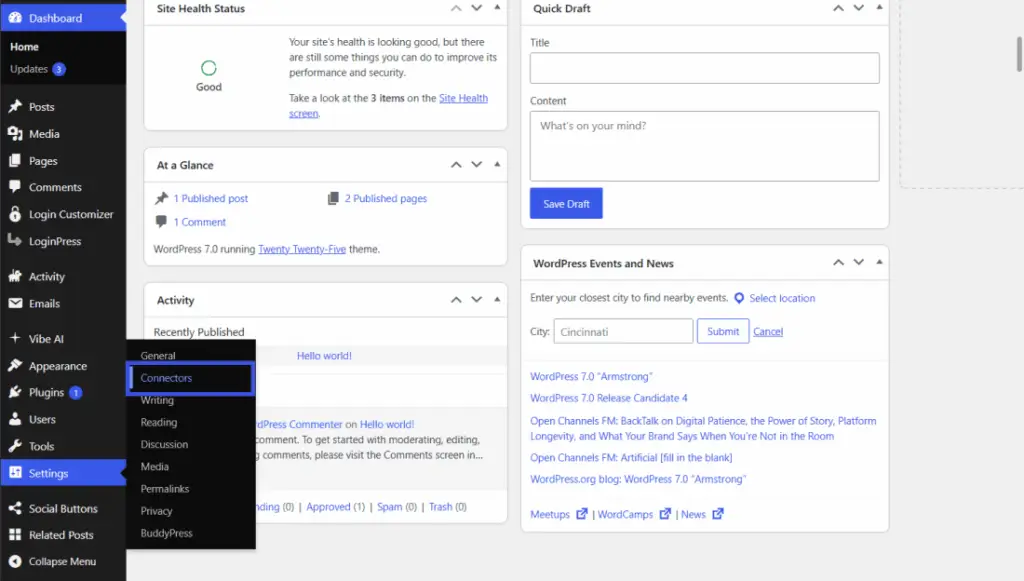
WordPress 7.0 added AI Connectors. You can now connect AI tools from companies like OpenAI, Anthropic and Google straight to your website. You’ll find this under Settings → Connectors.
What does that mean for you?
- AI can help write titles, short summaries and image descriptions.
- Plugins can use AI in a safe, standard way.
- AI assistants can now work with your website directly.
Many people think you need a custom-coded website to use AI. That is not true anymore. WordPress now has AI built in.
2. The Admin Area Got Easier to Use
WordPress also cleaned up its dashboard.
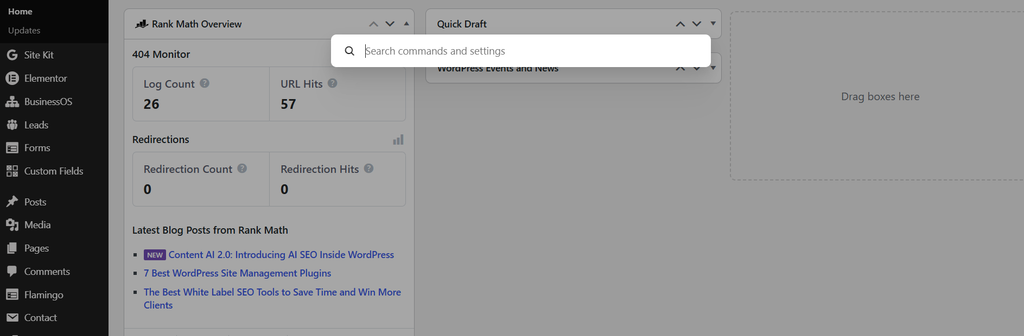
- Quick search (Command Palette): Press Ctrl + K (or Cmd + K on a Mac) to find any page, post or setting fast. There is also a button for it in the top admin bar.
- The admin bar stays with you: In WordPress 7.1, the black bar at the top now shows up in all the editors too. You always know where you are.
- A fresher look: The dashboard looks cleaner and more modern.
For a busy business owner, this means less time searching and more time working.
3. The Block Editor Can Now Do Mobile Design
This used to be a big reason people picked Elementor. Not anymore.
With WordPress 7.0 and 7.1, the Block Editor can now:
- Show or hide blocks on mobile, tablet or desktop.
- Style things differently on each screen size (called “responsive styling”).
- Style buttons for hover, click and focus. No code needed.
- Add custom CSS to one block only.
New blocks were added too: Breadcrumbs, Icons, Tabs and Playlist. Old blocks got better as well, like Paragraph, Cover, Grid and Image.
4. Why Block Sites (FSE) Are Winning
FSE means Full Site Editing. It means your whole website is built with WordPress’s own Block Editor: header, footer, pages, everything. No page builder needed.
For years, most people used Elementor, Divi or Bricks to build sites. These tools are good, but there is a problem.
Page builders are an extra layer on top of WordPress. When WordPress updates, and the builder doesn’t keep up, things can break. Layouts shift. Buttons stop working. Pages load slowly.
Block sites don’t have that problem, because the Block Editor is WordPress. When WordPress updates, your site updates with it.
Here is a simple way to see it:
| What Happens? | Page Builder Site | Block (FSE) Site |
|---|---|---|
| Breaks after updates? | Sometimes | Rarely |
| Speed | Often slower | Usually faster |
| Extra plugin needed? | Yes | No |
| Future-proof? | Depends on the builder | Yes, it’s WordPress itself |
That’s why more and more businesses are moving to block-based sites.
Want a fast, update-proof website?
WPDevelopers.pk builds modern FSE websites using the WordPress Block Editor.
Already have an old site built with Elementor, Divi, Bricks or another builder? We can maintain and update it for you, or move it to the Block Editor safely, without losing your content or rankings.
5. Better Tools for Building Pages
Here are a few more changes that make building easier:
- Block patterns: Ready-made sections you can drop in. Now they protect the design, so you only edit the text and images.
- Template editing: Easier to change page layouts, with a history (revisions) so you can go back.
- Navigation: Mobile menus can now be fully designed with blocks.
- Query Loop: Better ways to show lists of posts, now working with breadcrumbs.
- New media editor (7.1): Crop, flip, rotate and edit image details in one place.
- Better image handling (7.1): Images are now shrunk inside your browser before upload. This means less load on your server and fewer failed uploads. WordPress also now supports AVIF and HEIC (iPhone) photos.
- Accessibility: Better tooltips and screen reader support in the admin area.
6. A Quick Speed Tip (If You Still Use Elementor)
Many people miss this one.
Lazy loading means images load only when you scroll to them. That’s great for images lower on the page. But your hero image (the big image at the top) should not be lazy-loaded. It needs to show up right away.
If your hero image is lazy-loaded, your page looks slow, and Google notices. So:
- Open your Elementor performance/optimization settings.
- Make sure your hero image is not lazy-loaded.
- Keep lazy loading on for everything below it.
This small change can help your speed score a lot.
WordPress 7.1 also helps with speed. It does image work in the browser instead of on your server, and it makes pages load faster when users click links (called “speculative loading”).
7. The Biggest Story: Security
Now for the most important part.
Most of the recent updates were security fixes. Here is what happened:
- July 17 (7.0.2): Fixed a critical and a high-risk problem. WordPress even forced automatic updates because it was so serious.
- August 6 (7.0.3): Multiple security fixes.
- August 12 (7.0.4): Fixed a problem in how images are handled.
- September 17 (7.1.1): 11 security fixes.
- September 22 (7.1.2): Fixed a critical problem (CVE-2026-87902) that could let hackers get into a site without logging in. It affected WordPress versions going back almost 10 years.
- October 6, 2026 (7.1.3): Fixed seven security vulnerabilities, including stored XSS, SQL injection, and unauthorised access to private comments.
Here is the number that should get your attention:
In 2026, WordPress core has fixed 27 security problems so far. In all of 2025, it fixed only 6.
That doesn’t mean WordPress is unsafe. It means people are checking it more closely, and problems are being found and fixed fast. But fixes only protect you if your site is updated.
If your site is still on an old version, it’s an easy target.
Is your website safe right now?
WPDevelopers.pk offers WordPress security and maintenance: core updates, plugin checks, backups, malware scans and hardening. We keep your site updated, so you don’t have to worry. Send us a mail at contact@wpdevelopers.pk for your website security audit.
8. Is WordPress “Dead” Because of AI?
Lately, you may have heard people say things like:
- “AI can build a website in 5 minutes. Who needs WordPress?”
- “Just ask ChatGPT for HTML code, and you’re done.”
- “WordPress is old. Custom AI sites are the future.”
Indeed, AI can now make a simple website very fast. You type what you want, and AI writes the HTML code for you.
So is WordPress dead?
No. Here’s why, in simple words. Making a website is easy. Running a website is the hard part.
An AI-made HTML site looks great on day one. But what happens next?
You want to change a price or add a blog post. On a plain HTML site, you have to edit code or ask the AI again. On WordPress, you just log in and type. You want a contact form, booking system or online shop.
On WordPress, you add a plugin in minutes. On a custom site, someone has to build it from scratch. Your team needs to update the site. Most staff can’t edit code. But anyone can use the WordPress dashboard.
Something breaks, or a hacker finds a hole. WordPress has thousands of people fixing security problems. It fixed 27 core security problems this year alone.
An AI-made site has only you, and AI code can have hidden mistakes. You want good SEO. WordPress has proven SEO tools, sitemaps and plugins. With a custom site, you have to set all of that up yourself.
Here is a simple comparison:
| What to do? | AI-Made HTML Site | WordPress Site |
|---|---|---|
| Fast to create? | ✅ Very fast | ✅ Fast |
| Easy to edit without code? | ❌ No | ✅ Yes |
| Blog, forms, shop, bookings? | ❌ Must build yourself | ✅ Plugins ready |
| Security updates? | ❌ Only if you do them | ✅ Regular updates from WordPress |
| Good for a growing business? | ⚠️ Hard to grow | ✅ Built to grow |
| Good for a one-page test site? | ✅ Yes | ✅ Yes |
When is a custom HTML site okay?
For a very small, simple page that rarely changes, like a one-page event page. For a real business website that grows over time, WordPress still wins.
WordPress is not fighting AI. It’s using it.
This is the part many people miss. WordPress now has AI built right in:
- AI Connectors let you plug in tools from OpenAI, Anthropic and Google.
- AI can help write titles, summaries and image descriptions.
- The Abilities API lets AI assistants work with your WordPress site safely.
So you don’t have to choose between AI and WordPress. You get both. You get the speed of AI plus a strong, safe system to run your business on.
And what about Google search?
Some people also say “AI will kill search.” Search is changing, not dying. People now get quick answers from AI tools and Google’s AI answers. But those answers still come from websites, especially sites that are fast, safe, well organised, and full of useful content. A well-kept WordPress site fits that job very well.
The truth:
WordPress’s share of the web has dropped a little, from about 43% to about 40%, as Wix, Shopify and AI site builders grow. WordPress knows this.
That’s exactly why it has shipped 8 releases in 4 months, with AI, better design tools and fast security fixes.
WordPress isn’t dying. It’s racing to stay ahead. It still runs about 4 out of every 10 websites in the world.
Not sure what’s right for your business?
Whether you want a modern WordPress site, want to add AI features to your current site, or are thinking about moving away from an AI-made HTML site that’s hard to manage, WPDevelopers.pk can help you choose and build the right thing.
9. For Developers: What to Do Next
A quick note if you build WordPress sites:
- Learn the Abilities API. It lets your plugin tell WordPress (and AI tools) what it can do. This is where plugins are heading.
- Try the AI Client. Use
wp_ai_client_prompt()to talk to AI models without hardcoding one company’s API. - Build block themes. Use
theme.jsonfor responsive breakpoints and hover/focus styles. - Try PHP-only blocks. You can now register simple blocks with just PHP.
- Check the iframed editor. The post editor now loads inside an iframe for all themes. Test your editor styles.
- Watch DataViews and DataForm. This is the new way to build admin screens.
- Update fast. With security releases every few weeks, auto-updates and testing are a must.
The pattern is clear: WordPress is moving toward blocks, AI and speed. Page builders will stay around for a while, but new projects should start with blocks.
What Should You Do Now?
Here is a simple checklist:
- Update to WordPress 7.1.2 today.
- Update your plugins and theme too.
- Take a full backup before big changes.
- Check that your hero image isn’t lazy-loaded.
- If your site uses an old page builder, think about moving to blocks.
- If you don’t have time, get an expert to handle it.
Let WPDevelopers.pk Handle It
WordPress is moving fast. You don’t have to keep up alone.
At WPDevelopers.pk, we help businesses:
- Build fast, modern FSE / Block Editor websites
- Maintain and update Elementor, Divi and Bricks sites
- Migrate old page-builder sites to the Block Editor
- Secure WordPress sites with regular updates, scans and backups.
Sources (for reference):